Every day millions of emails are sent with forged sender addresses. Cybercriminals impersonate your domain to deceive your customers, employees, and partners. Sender Policy Framework — SPF for short — is one of the oldest and most widely deployed defences against this. Understanding how SPF works, what it can and cannot do, and why it matters especially in the context of DMARC is essential for any organisation serious about email security.
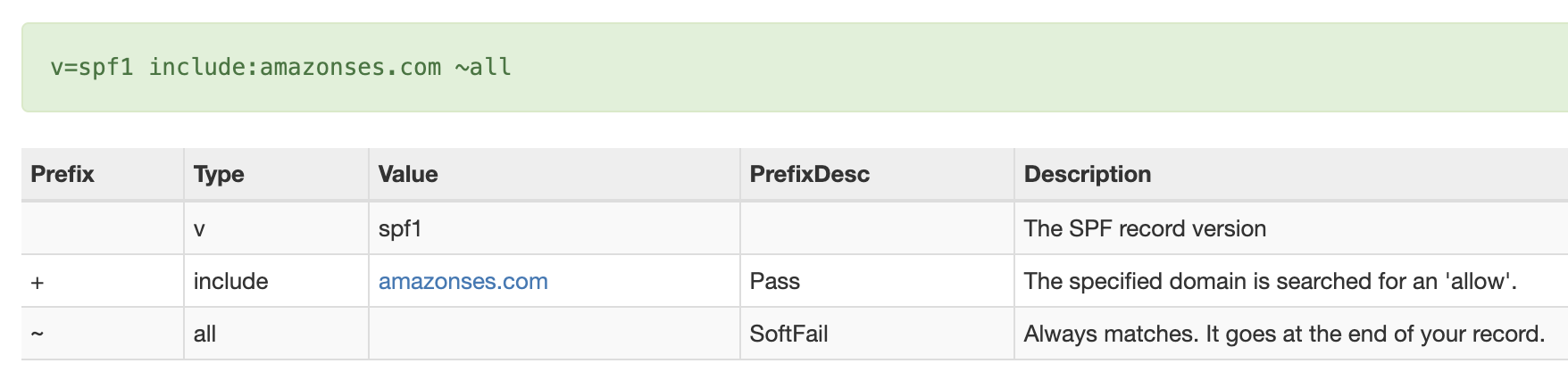 SPF entry for dmarcflow.com
What Is SPF?
Sender Policy Framework is an email authentication standard described in RFC 7208. It allows the owner of a domain to publish, in DNS, a list of mail servers and IP addresses that are authorised to send email on behalf of that domain. When a receiving mail server gets an email, it can look up this list and check whether the sending server is on it.
SPF works at the envelope level, specifically on the MAIL FROM address (also called the return-path or envelope sender). This is the address the sending server uses in the SMTP transaction — it is not necessarily the address you see in your email client's "From" field. This distinction is critical and comes back when we discuss DMARC alignment below.
By itself, SPF is a useful first filter. But it has well-known limitations, which is why it works best when combined with DKIM and governed by DMARC.
How SPF Works – Step by Step
When a mail server receives an incoming message, the SPF evaluation follows these steps:
- The receiving server extracts the domain from the MAIL FROM (envelope sender) address of the SMTP transaction. If MAIL FROM is empty — which can happen for delivery status notifications — the HELO/EHLO domain is used instead (the HELO scope).
- The receiving server performs a DNS TXT lookup for the SPF record at that
domain, for
example
_spf.example.comor simply atexample.com. - The server evaluates the mechanisms in the SPF record in order —
ip4,ip6,include,a,mx, and so on — to see whether the sending IP address matches any of them. - Once a match is found, the associated qualifier (
+,-,~, or?) determines the result: pass, fail, softfail, or neutral. If no mechanism matches, theallmechanism at the end provides a default result. - The result is included in the email headers and can be used by the receiving server to decide whether to deliver, quarantine, or reject the message.
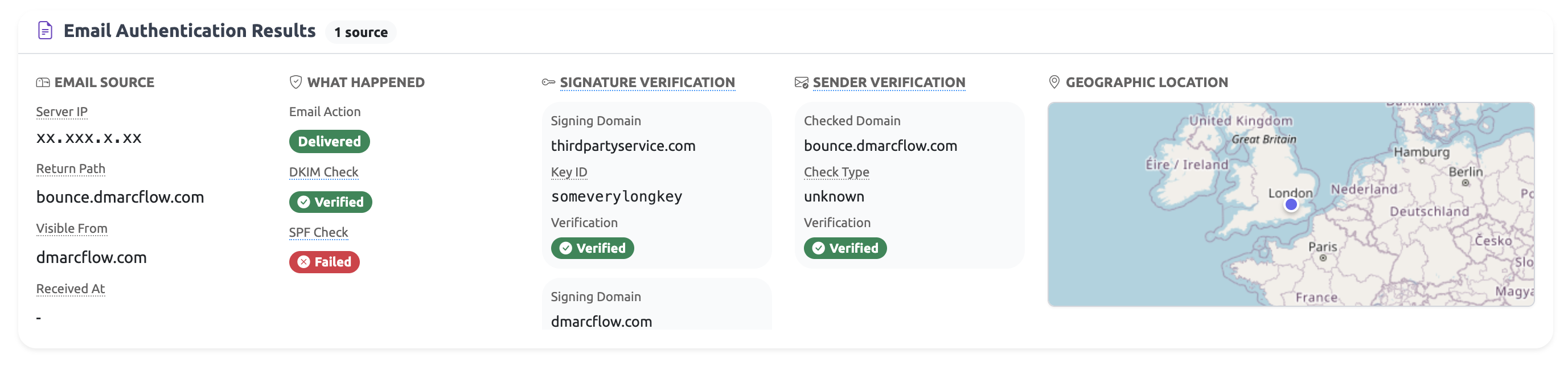 raw DMARC view for dmarcflow.com
Anatomy of an SPF Record
An SPF record is a DNS TXT record published at your domain. It always starts with
v=spf1 and ends with an all mechanism. Here is a typical
example:
v=spf1 include:_spf.google.com include:mailgun.org ip4:203.0.113.10 ~allThe key components are:
| Mechanism / Modifier | What it does | Example |
|---|---|---|
v=spf1 |
Declares the record as SPF version 1. Mandatory first tag. | v=spf1 |
ip4 / ip6 |
Authorises a specific IPv4 or IPv6 address or CIDR range. | ip4:203.0.113.0/24 |
include |
Imports the SPF record of another domain (e.g. an ESP or cloud service). | include:_spf.google.com |
a |
Matches the A (or AAAA) record of the domain — the web server IP. | a |
mx |
Matches the IPs of the domain's MX records — the inbound mail servers. | mx |
redirect |
Replaces the current record with another domain's SPF record entirely. | redirect=_spf.example.com |
all |
Catch-all at the end. Qualifier determines result for everything not matched above. | -all (fail), ~all (softfail) |
The qualifiers before each mechanism are:
+(default, pass) — the sending IP is authorised.-(fail) — the sending IP is explicitly not authorised.~(softfail) — the sending IP is probably not authorised; used as a soft warning.?(neutral) — no assertion is made about the sending IP.
SPF Results Explained: pass, fail, softfail, neutral, and more
The SPF evaluation produces one of several results:
| Result | Meaning | Typical cause |
|---|---|---|
pass |
The sending IP is authorised by the SPF record. | All legitimate senders configured correctly. |
fail |
The sending IP is explicitly not authorised (-all). |
Spoofed email, or a legitimate sender not included in SPF. |
softfail |
The sending IP is probably not authorised (~all). Delivery may
still occur.
|
Transition phase, or a missing sender. |
neutral |
The domain makes no assertion about the sending IP (?all). |
Explicitly non-committal record — rare in production. |
none |
No SPF record found for the domain. | SPF not yet deployed, or domain has no TXT record. |
temperror |
A transient DNS error occurred during evaluation. | DNS outage, timeout, or temporary resolver issue. |
permerror |
A permanent error in the SPF record (syntax error, too many DNS lookups). | Misconfigured record or the 10-lookup limit exceeded. |
Only a pass result can satisfy SPF for DMARC purposes — but that is only
half the
story. The domain also needs to align.
SPF and DMARC – Alignment Is Everything
This is where many administrators get confused. SPF can pass perfectly — the sending IP is listed in the SPF record — and yet DMARC can still fail. The reason: SPF alignment.
DMARC checks whether the domain authenticated by SPF (the MAIL FROM / envelope-from domain) aligns with the domain in the visible Header-From address — the one your recipients see in their inbox. Two modes are available:
- Relaxed alignment (
aspf=r, the default) — the organisational domains must match. For example,bounce.example.comaligns withexample.com. - Strict alignment (
aspf=s) — the domains must be identical.bounce.example.comdoes not align withexample.com.
Many email service providers (ESPs) and cloud platforms use their own domain as the MAIL FROM address when sending on your behalf. Google Workspace, Amazon SES, Mailchimp, HubSpot — they all have different default behaviours. In some cases the SPF pass occurs for their domain, which does not align with your Header-From domain, causing DMARC SPF to fail even though raw SPF passes.
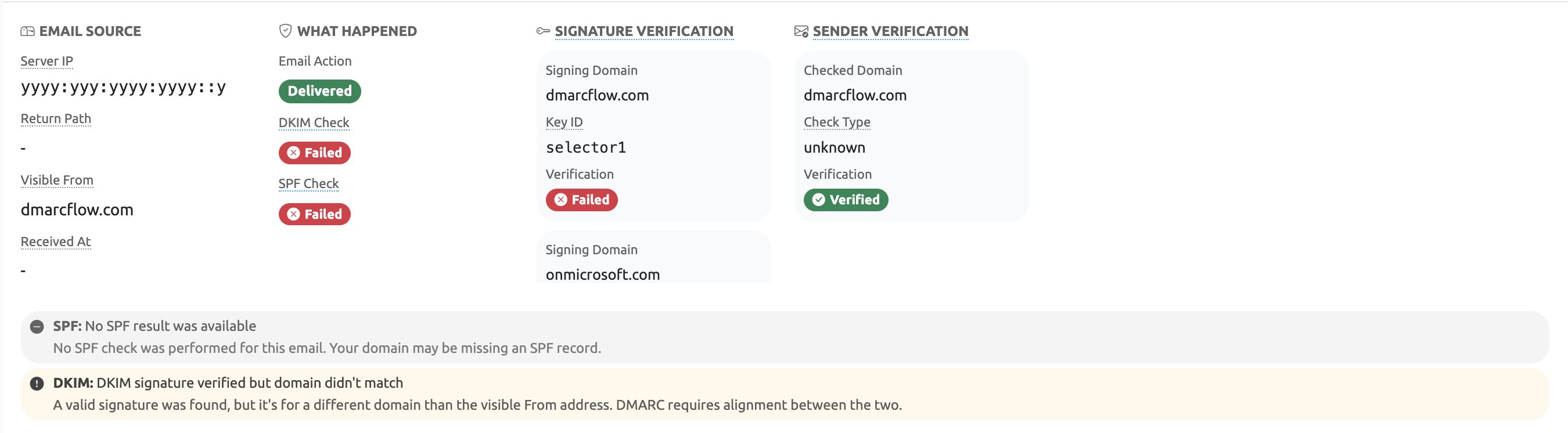 Insights for SPF/DKIM reasons
How DMARCFlow Explains SPF Alignment in DMARC Reports
Reading DMARC XML reports is tedious. The raw data tells you that SPF passed or failed, but not why it matters for DMARC. DMARCFlow parses every DMARC aggregate report record and runs a dedicated SPF insight analysis that translates the raw result into plain language. There are five possible outcomes:
| Scenario | What it means |
|---|---|
| MAIL FROM aligned pass | SPF passed in the MAIL FROM scope and the authenticated domain aligns with your Header-From. This is the ideal outcome — DMARC SPF is satisfied. |
| MAIL FROM pass, not aligned | SPF passed for a MAIL FROM domain, but that domain does not match the Header-From under the configured alignment mode. DMARC SPF fails despite the SPF pass. |
| Only HELO pass | Only the HELO/EHLO domain produced an SPF pass. DMARC does not evaluate HELO for alignment, so this cannot satisfy DMARC SPF. |
| MAIL FROM result not a pass | A MAIL FROM SPF result was present but it was fail, softfail,
neutral, none, temperror, or
permerror. None of these satisfy DMARC.
|
| No relevant SPF results | No MAIL FROM or HELO SPF result was found at all. Without any SPF evaluation, DMARC SPF cannot be satisfied. |
Instead of staring at cryptic XML, DMARCFlow shows you exactly which scenario applies to each sending source in your reports, along with the authenticated domain, the Header-From domain, and whether alignment succeeded or failed. This makes it straightforward to identify misconfigured senders and take targeted action.
Common SPF Problems and How to Fix Them
Most SPF issues fall into a few recurring categories:
- Missing senders. You added a new email service (a CRM, marketing platform, or transactional email provider) but forgot to add it to your SPF record. Emails from that service fail SPF for your domain.
- Alignment mismatch. Your ESP uses its own domain in the MAIL FROM field. SPF passes for the ESP's domain, but DMARC SPF fails because the ESP's domain does not align with your Header-From. The fix is usually to configure a custom MAIL FROM (return-path) domain at the ESP that matches your own domain.
- Forwarded email. When email is forwarded by a third party, the sending IP changes. The new sending server is not listed in your SPF record, so SPF fails. This is a fundamental limitation of SPF — DKIM handles forwarding better since it is based on a cryptographic signature rather than the sending IP.
- Softfail instead of fail. Using
~allat the end of your SPF record means unauthenticated messages produce a softfail rather than a hard fail. While this is safer during initial deployment, it does not enforce strict rejection. Move to-allonce you are confident all legitimate senders are covered. - Multiple SPF records. A domain must have exactly one SPF TXT
record. If you
have two, evaluating mail servers will return a
permerrorand SPF will fail. Merge all mechanisms into a single record. - Exceeding the 10-lookup limit. See the next section.
SPF Limits: The 10-Lookup Trap
SPF imposes a hard limit: the evaluation of a single record may not trigger more than
10
DNS lookups. Mechanisms that cause lookups include include,
a,
mx, ptr, and exists. Exceeding this limit
results in a
permerror, which counts as an SPF failure for DMARC purposes.
This is a common problem for organisations that use many third-party services. Each
include counts as one lookup, but the nested includes within
that domain
also count. Google Workspace, for example, has its own nested includes inside _spf.google.com.
Add three or four major ESPs and you can quickly approach or exceed the limit.
The solution is to flatten your SPF record — replacing include
references with the
actual IP ranges they resolve to — or to use a managed SPF service that
automatically maintains
a flattened record. DMARCFlow flags permerror results in reports and
identifies
when the lookup limit is the root cause.
How DMARCFlow Turns SPF Complexity Into Clarity
Understanding SPF in isolation is one thing. Acting on it in the context of real email traffic across dozens of sending services and domains is another. This is where DMARCFlow adds significant value.
DMARCFlow is a DMARC monitoring and reporting platform built around making email authentication understandable and actionable. When it comes to SPF specifically, DMARCFlow offers:
- Per-record SPF insight analysis. Every record in every DMARC report is individually analysed. DMARCFlow determines not just whether DMARC SPF passed or failed, but why — matching it to one of the five insight scenarios described above: aligned MAIL FROM pass, unaligned MAIL FROM pass, HELO-only pass, non-pass MAIL FROM result, or no relevant SPF at all.
-
Alignment mode awareness. DMARCFlow reads the
aspftag from your actual DMARC policy and evaluates every SPF result against the correct alignment mode — relaxed or strict — so the analysis always reflects your real configuration. - Authentication failure analysis. When SPF failures appear across multiple records, DMARCFlow groups them, calculates failure rates, and surfaces the top failing sending sources so you know which IP addresses and senders to investigate first.
- Policy validation. DMARCFlow cross-checks your DMARC policy for consistency issues — for example, whether your alignment mode is appropriate for your sending infrastructure, and whether your enforcement level (none / quarantine / reject) is aligned with the pass rates you are seeing.
- Maturity level tracking. DMARCFlow assigns your domain a DMARC maturity level from 0 (no protection) to 5 (maximum protection with strict alignment and full reject enforcement). SPF alignment is a direct input: if your SPF is not properly aligned, reaching higher maturity levels is blocked and DMARCFlow shows you exactly why.
- Security score with component breakdown. Each domain gets a security score out of 100. The breakdown makes it transparent how SPF, DKIM, policy enforcement, coverage, and reporting each contribute — or detract — from the overall score.
- Recommendations engine. Based on your actual data, DMARCFlow generates prioritised, actionable recommendations. If your SPF is failing due to an unaligned MAIL FROM at a specific ESP, it tells you what to configure and how.
- GDPR-compliant, EU-hosted. All report data is processed and stored exclusively within the European Union. No personal data is retained. This matters for organisations subject to GDPR and those that handle data for EU residents.
Conclusion
SPF is a foundational piece of email authentication. It declares which servers are permitted to send email for your domain and gives receiving mail servers a way to verify that claim. But SPF alone is not enough — it breaks with forwarding, it operates only at the envelope level, and its value for DMARC depends entirely on whether the authenticated domain aligns with the Header-From address your recipients actually see.
Understanding the five SPF alignment scenarios — from a clean aligned pass to a HELO-only result with no DMARC value — is what separates organisations that merely have an SPF record from those who have genuinely secured their email. The path from "SPF exists" to "DMARC enforced with SPF alignment" requires visibility into what is actually happening in your mail streams.
DMARCFlow provides that visibility. It parses your DMARC reports, classifies every SPF result by alignment outcome, highlights failure patterns, and gives you targeted recommendations to close the gaps. Whether you are just starting out with email authentication or already running at quarantine policy and looking to move to reject, DMARCFlow gives you the insight to move forward with confidence.
Stay ahead of email threats
Get practical email security insights — SPF, DKIM, DMARC, and beyond — delivered to your inbox. No spam, unsubscribe anytime.